

As an Amazon Associate, SnoutTech earns from qualifying purchases. Some links on this page are affiliate links, at no extra cost to you.
The best pet camera lets you see the room your pet is in, talk back and, if you want, toss a treat. The bigger question is what still works once the free trial ends. Some Furbo, Petcube and TKENPRO features need a paid plan, while Tapo lets you record to a microSD card with no storage fee. We compared eight camera listings, including two Furbo versions, on exactly that, so you know what you’re paying for before you plug one in.
Last updated: October 2026.
Quick picks
- Best treat-tossing dog camera: Furbo 360° Dog Camera (Core Features, No Ongoing Cost).
- Best if you want Furbo’s AI alerts: Furbo 360° Dog Camera (Paid Plan Required).
- Best lower-priced treat-tossing camera: TKENPRO 2K Pet Camera Treat Dispenser.
- Best for cats: Petcube Cam 360.
- Best for multi-pet homes: PETLIBRO Dog Camera with AI pet recognition.
- Best for Apple HomeKit homes: eufy Security Indoor Cam E220.
- Best budget pet camera: Tapo C210 2K Pan/Tilt.
- Best for checking more than one room: Enabot EBO SE robot camera.
Pet cameras compared
| Camera | Best for | Price tier | Treats | Free without a plan (per listing) |
|---|---|---|---|---|
| Furbo 360° (Core) | Dogs, treat tossing | Premium | Yes | Live view, barking alerts, treats |
| Furbo 360° (Paid Plan) | AI dog alerts | Mid-range + plan | Yes | Needs a plan to activate; core stays if you cancel |
| TKENPRO 2K | Treat tossing, lower tier | Mid-range | Yes | Not stated; cloud extras paid |
| Petcube Cam 360 | Cats, whole-room view | Mid-range | No | Live HD streaming |
| PETLIBRO AI camera | Two to five pets | Mid-range | No | Check listing |
| eufy Indoor Cam E220 | HomeKit users | Mid-range | No | Not stated |
| Tapo C210 | Tight budgets | Budget | No | microSD recording |
| Enabot EBO SE | Several rooms | Premium | No | Not stated |
How we evaluated these cameras
We didn’t install all eight cameras in one home for this article, and we won’t pretend we did. We read each Amazon listing, checked stock and ratings on Amazon (US, ZIP 10001) in October 2026, and sorted the listed features into what works out of the box and what needs a subscription. Where a listing doesn’t say, we tell you.
We didn’t test streaming quality. On paper, the bigger differences are treat tossing, how much of the room you can see, and what alerts and video history cost after the trial.
What does a pet camera actually tell you?
Short answer: a pet camera shows you what your pet does after you leave. For dogs, the first minutes matter most, because that’s when separation-related distress tends to show.
The ASPCA’s guide to separation anxiety notes that a dog with separation anxiety often starts barking or showing distress within minutes of being left alone. Sound alerts prompt you to check in, so you can see whether your dog is barking and pacing or simply napping. A camera records behavior; it can’t tell you the cause. If you see persistent barking, chewing at doors or escape attempts, take the footage to your vet.
Pro Tip: for the first few departures, review the footage from soon after you leave and note anything that repeats. That’s the most useful clip to show your vet.
1. Furbo 360° Dog Camera (Core Features): best treat-tossing dog camera
Bottom line: this is the Furbo to buy if you want the treat toss, the rotating view and barking alerts without a monthly bill. Per the listing, the core features (1080p live view, 360° rotation, barking alerts, two-way audio, color night vision and treat tossing) work out of the box with no subscription.
![Furbo 360° Dog Camera [Core Features, No Ongoing Cost]](https://m.media-amazon.com/images/I/41z8W6tbWJL._AC_.jpg)
The listing says you can customize the treat size, which helps if you have a small dog. New users also get a 14-day trial of Furbo Nanny, the paid plan that adds AI alerts and video history. When the trial ends, the core features stay.
Limitation: it’s in the premium tier, and after the trial, AI alerts and video history need Furbo Nanny. We hid this card’s bullets because one calls the video “best-in-class,” which we can’t compare.
Who this is NOT for: owners who want AI alerts and recorded video history without paying for a plan. The Tapo C210 records to a microSD card instead.
2. Furbo 360° Dog Camera (Paid Plan Required): best if you want Furbo’s AI alerts
Bottom line: this Furbo 360° listing describes the same core features as the Core version, sits in a lower price tier, and does nothing until you activate a Furbo Nanny plan. Pick it only if you already know you want the AI alerts and video history.
![Furbo 360° Dog Camera [Paid Plan Required to Activate]](https://m.media-amazon.com/images/I/41bxvqBF-iL._AC_.jpg)
Per the listing, the plan adds alerts for barking, unusual activity and emergencies, plus 3 to 7 days of video history. The listing says that if you cancel, the core features (live view, two-way audio, treat toss) stay on. The listing offers yearly and monthly plans, with an activation fee on the monthly option; check the current terms before you buy.
Limitation: no features work before activation, so the camera price is not the full cost. We hid this card’s bullets because they quote plan prices, and those can change.
Who this is NOT for: anyone who just wants live view and treats. The Core version above includes those with no plan.
Is Furbo worth it?
Furbo is worth it if treat tossing is the main reason you want a camera. The two listings above differ in how you pay: the Core version sits in a higher price tier and needs no plan, while the Paid Plan version sits in a lower tier but needs a plan before it does anything. Add up the camera plus a year of the plan before you decide which costs less for you.
3. TKENPRO 2K Pet Camera Treat Dispenser: best lower-priced treat-tossing camera
Bottom line: TKENPRO gives you a treat dispenser, a 2K camera and 355° pan rotation in the mid-range tier, below the Furbo Core version. It’s the pick if you want treat tossing with no Furbo plan to think about.

- Pet Camera with Treat Tossing: Combination of the dog camera and treat dispenser (0.5L capacity, Recommend 7-15mm food s…
- Unlock the Time Album with Cloud Subscription: AI automatically create a 60-second video of your pet’s best moments from…
- 2K Ultra HD Camera & Night Vision:With 2K Full HD crystal clear pet camera indoor, you could see your furry puppy or cat…
Per the listing, the dispenser holds 0.5 L and works best with treats 7 to 15 mm across. It works on both 2.4 GHz and 5 GHz Wi-Fi, which helps in homes where the 2.4 GHz band is crowded. The listing also mentions motion and bark detection with auto tracking.
Limitation: the AI “Time Album” highlight videos need TKENPRO’s cloud subscription, per the listing. The listing recommends treats 7 to 15 mm across, so check that your dog’s treats fit that range.
Who this is NOT for: owners who want the AI highlight videos without a cloud plan. It also has far fewer ratings than Furbo (about 1,000 vs about 9,000), so there’s less buyer feedback to go on.
4. Petcube Cam 360: best for cats
Bottom line: the Petcube Cam 360 is a pan-tilt camera with 8x zoom and night vision up to 30 feet, per the listing. It streams live HD free with no subscription, and the zoom helps you find a cat on a shelf or under a chair.

Per the listing, Petcube’s Care plan adds smart alerts, 90-day video history, a Daily Diary and filters for eating, drinking and activity. The Premium plan lists AI Vet chat and live vet access. It also has a physical privacy mode that blocks the lens, which is useful if the camera sits in a living room.
Limitation: it has no treat dispenser, and it connects to 2.4 GHz Wi-Fi only. We hid this card’s bullets because one implies the app helps spot health problems “when they’re easier to treat,” which is a health claim we can’t check.
Who this is NOT for: dog owners who want to reward their dog remotely. Go with Furbo or TKENPRO.
5. PETLIBRO Dog Camera: best for multi-pet homes
Bottom line: PETLIBRO’s camera recognizes up to five cats and dogs individually, per the listing, and tracks eating, drinking, playing and resting. If you have two or more pets and want to know which one is doing what, this is the camera built for that.

- AI Pet Camera Smart Recaps: This AI pet camera automatically creates smart recaps, daily highlight reels, and timeline c…
- Dog Camera with AI Pet Recognition: The dog camera recognizes up to 5 cats and dogs individually, making this pet camera…
- Pet Camera Indoor with Activity Tracking: This pet camera indoor tracks pet activity, resting, movement, and behavior pa…
The listing describes 360° auto tracking, person detection, two-way audio, 1080p video, night vision and daily highlight reels.
Limitation: the bullets don’t say whether the AI recaps and pet recognition need a PETLIBRO subscription. Check the listing’s details before you buy if that’s the reason you want it.
Who this is NOT for: budget buyers who don’t need each pet recognized separately. The Tapo C210 covers live view and alerts in the budget tier.
6. eufy Security Indoor Cam E220: best for Apple HomeKit homes
Bottom line: the eufy E220 uses on-device AI to tell a pet from a person and records on events rather than all day, per the listing. It works with Apple HomeKit, Google Assistant and Alexa, which makes it a good fit if your home already runs on one of them.
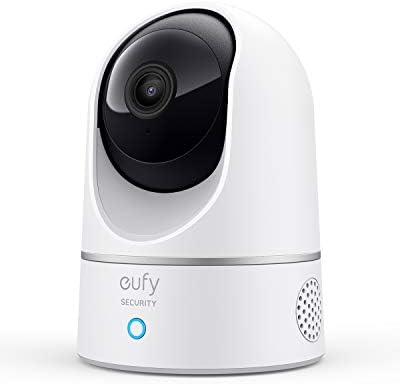
- 𝐑𝐞𝐥𝐞𝐯𝐚𝐧𝐭 𝐑𝐞𝐜𝐨𝐫𝐝𝐢𝐧𝐠𝐬 | The on-device AI determines whether a human or pet is present and only records when an event of in…
- 𝐓𝐡𝐞 𝐊𝐞𝐲 𝐢𝐬 𝐢𝐧 𝐭𝐡𝐞 𝐃𝐞𝐭𝐚𝐢𝐥 | View every event in up to 2K clarity (1080P while using HomeKit) so you see exactly what is h…
- 𝐒𝐦𝐚𝐫𝐭 𝐈𝐧𝐭𝐞𝐠𝐫𝐚𝐭𝐢𝐨𝐧 | Connect your IndoorCam to Apple HomeKit (download our HomeKit User guide in the product information …
It pans and tilts and tracks movement automatically; how much you see depends on where you place it. With more than 21,000 ratings, it’s one of the most reviewed cameras in this list.
Limitation: video drops from 2K to 1080p when you use it through HomeKit, per the listing. It supports 2.4 GHz Wi-Fi only, and the listing doesn’t mention a treat dispenser.
Who this is NOT for: owners who want treat tossing or a pet activity diary; the listing doesn’t mention either.
7. Tapo C210: best budget pet camera
Bottom line: the Tapo C210 is the budget-tier pick in this list, with 2K video and pan and tilt. You can record to a microSD card (up to 512 GB) at no ongoing cost, per the listing, or pay for Tapo Care cloud storage.
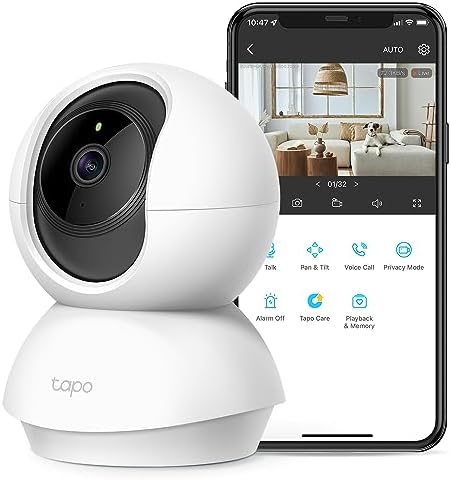
- 2K HIGH DEFINITION: Capture every detail inside your home with crystal-clear 2K high definition video with this indoor s…
- SEE MORE WITH PAN/TILT: This Pan/Tilt IP camera see everything across an entire room or walkway with the 360° horizontal…
- NO SUBSCRIPTION STORAGE OPTION – Store recordings on a microSD card at no cost◇ (up to 512GB) or subscribe to Tapo Care’…
The listing gives 360° horizontal and 114° vertical coverage, night vision up to 30 feet and two-way audio. It can send motion and person alerts, and it streams to Echo Show and Chromecast or Nest displays.
Limitation: it’s a home security camera that also detects pets. The listing doesn’t mention a treat dispenser or pet diary, and it needs 2.4 GHz Wi-Fi. It has a built-in siren, so consider leaving that off if your pet reacts badly to loud sounds.
Who this is NOT for: owners who want to interact with their pet beyond talking.
8. Enabot EBO SE: best for checking more than one room
Bottom line: the EBO SE is a small robot camera you drive around your home from the app, per the listing. It’s the only pick here you can steer from room to room to look for your pet, and it returns to its dock to recharge on its own.
It streams 1080p video with night vision and two-way audio, and its low height gives you a pet’s-eye view under furniture. That makes it useful for checking on a cat that hides under furniture.

- Remote Control, Mobile View: Drive EBO SE mobile robot camera to find your pets or check on family. Navigate through dif…
- 1080P Clarity & Night Vision: Check in with clear 1080P views. With enhanced night vision, EBO SE pet camera robot lets …
- Stay Connected with Two-Way Audio: Talk to your family or pets in real-time. Whether it’s a quick “hello” or comforting …
Limitation: it uses the ROLA app, not the EBO Home app, per the listing. The listing also says to keep the dock area clear and avoid mirrors nearby, which can interfere with its infrared signals. A robot can’t climb stairs, so it covers one floor.
Who this is NOT for: pets that get upset by moving objects. Try it while you’re home first and watch how your pet reacts.
How to choose a pet camera
Do you need treat tossing?
Treat tossing is the feature that makes a camera feel like a pet camera. Only Furbo and TKENPRO in this list have it. If your pet isn’t interested in dispensed treats, focus on view, alerts and audio instead.
Fixed view or pan-tilt?
A pan-tilt camera can rotate to find your pet. A fixed camera only sees one angle, so it needs careful placement. The seven fixed cameras in this list all rotate or pan and tilt; the EBO SE changes position by driving.
What happens after the free trial?
Check what still works without a plan. Furbo Core, Petcube Cam 360 and Tapo keep live view free. The Furbo Paid Plan version doesn’t work at all until you subscribe. Add a year of the plan to the camera price when you compare.
Which Wi-Fi band does it need?
The Petcube Cam 360, eufy E220 and Tapo C210 listings require 2.4 GHz Wi-Fi. TKENPRO lists both 2.4 GHz and 5 GHz. Check the Wi-Fi signal where you plan to put the camera, since a weak connection can affect live view.
Black Friday tip: last year, Bing searches for “Furbo” ran above their usual level in November and December, and “pet camera” searches jumped in December. Check the current price on the listing, and compare the camera-plus-plan total, not just the camera price.
Frequently asked questions
Does Furbo need a subscription?
It depends on the version. The Furbo 360° Core Features listing works with no subscription for live view, barking alerts, two-way audio and treat tossing. The Paid Plan Required listing needs Furbo Nanny before any feature works.
Can a pet camera work without Wi-Fi?
Not for remote viewing. The camera needs a Wi-Fi connection to the internet before you can see your pet from your phone. The Tapo C210 records to a microSD card; check the listing for how recording behaves during an internet outage.
Is a pet camera good for cats?
Yes. Pick for your cat’s habits: a pan-tilt camera with zoom, like the Petcube Cam 360, helps you find a cat that moves around, and the EBO SE can look under furniture.
Can I use a regular security camera as a pet camera?
Yes. The Tapo C210 and eufy E220 are home security cameras that can double as pet cameras. Both list pet detection, live view and two-way audio. Their listings don’t mention treat tossing or a pet diary.
Our verdict
Our top pick for dog owners is the Furbo 360° Core Features camera, because the treat toss, rotating view and barking alerts all work without a plan. If you want treat tossing in a lower price tier, the TKENPRO 2K is the alternative. Cat owners should look at the Petcube Cam 360, and anyone on a tight budget can start with the Tapo C210.
A camera is a good start for a smart pet setup. Pair it with an automatic cat feeder, keep your dog busy with interactive dog toys, or give a bored cat one of these interactive cat toys.
